Personal project
Blueprint
blueprint-psi-ten.vercel.app →Overview
Furnishing a flat is a long series of small bets: whether the six-foot wardrobe leaves room for the door to swing, whether the desk belongs by the window or would just sit in glare all afternoon. Tape measures answer the first kind of question badly and the second kind not at all. Blueprint is a model of one specific home that I can rearrange freely and then watch through a day.
How the idea started. I had a 3BHK in Bengaluru to set up and a floor plan that only existed as a brochure drawing. General-purpose planners wanted me to redraw the flat in their vocabulary, pick from their catalogue, and sign in to save. I wanted my walls, my dimensions, and furniture in the sizes actually sold here — so the flat itself became the starting state of the app.
Why it is personal software. It opens on my flat, not an empty canvas: the walls, doors, and windows are already drawn, the entrance already faces east, and the sizes are in feet because that is how every furniture listing I read is written. The layout saves to the browser, so there is no account and nothing to sync. It only has to be right about one home.
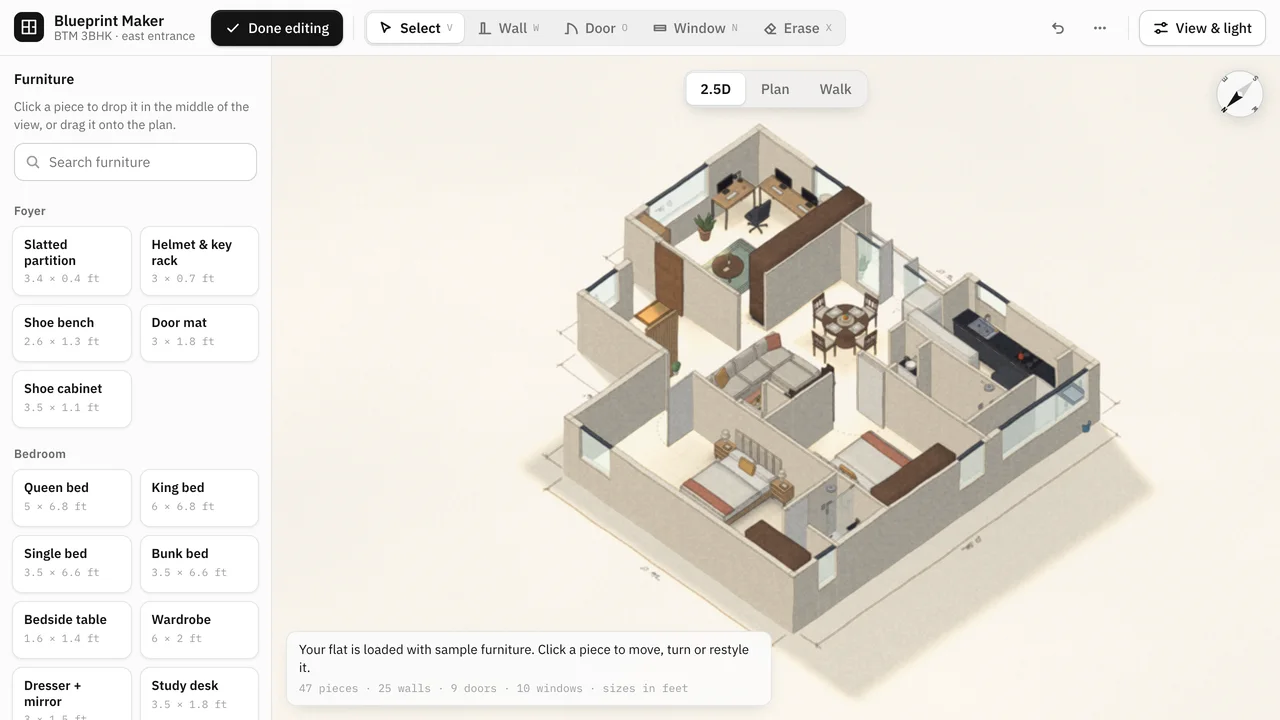
Editing stays direct. Click a catalogue piece to drop it in the middle of the view or drag it onto the plan, then move, turn, resize, or change its finish. Walls, doors, and windows have their own drawing tools with single-key shortcuts, undo goes back through all of it, and a browse mode locks editing for when I only want to look around or hand the phone to someone else.
The daylight is the point. The sun is placed from the latitude, the time of day, and the season, so morning light pours in from the entrance side and winter light leans in from the south. Direct sun reaches the interior only through real openings. That light, plus soft sky light, is baked into a light map on the floor and bounced off sunlit surfaces back into the room — which is what makes a room with one small window read as dim rather than evenly lit.
Two drawing styles, three viewpoints. The illustrated look is the warm default; the technical look strips it back to a dimensioned drawing. The 2.5D cutaway shows the whole flat at once, Plan flattens it for measuring, and Walk drops to eye level to check how a room feels from the doorway.
It is small on purpose. Vanilla JavaScript, Three.js, and Vite, with no UI framework. Three.js is pinned to a single release because the soft-shadow shader patch and the lighting setup are written against it.
Key Achievements
- A plan you can rearrange — A furniture catalogue in real feet-and-inches sizes; drop a piece in, then drag, turn, resize, and refinish it
- Honest daylight — The sun follows its actual path at Bengaluru's latitude by time of day and season, entering only through windows, glass doors, and the open balcony
- Baked bounce light — Direct and sky light are baked into a floor light map and reflected back into the rooms, so they are bright or dim for the right reasons
- Three ways to look — A 2.5D cutaway, a flat plan, and an eye-level walk, in illustrated or technical drawing styles, on desktop, tablet, or phone
Technologies
Outcome
Blueprint turns “will it fit, and will the room still get light?” into something I can answer by dragging a wardrobe and scrubbing the clock, before anything is bought or moved.