Personal project
Tabbit
github.com →Overview
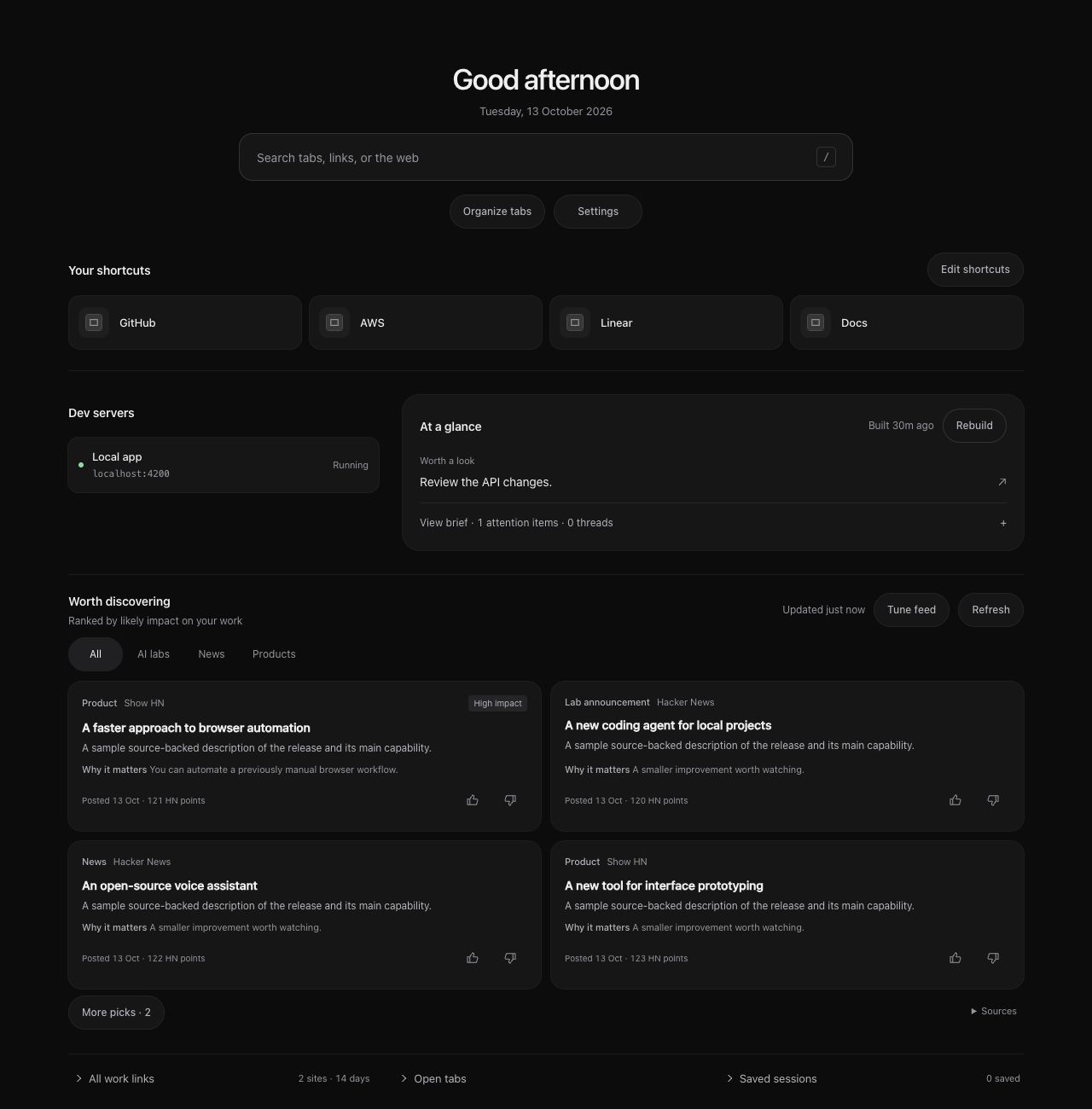
Tabbit began as a way to tidy a crowded tab bar. It has grown into the page I want to see between tasks: familiar work links, running dev servers, a short brief, and a small collection of relevant news and new products. Native Chrome tab groups still do the organizing. The new tab makes the rest of the browser easier to return to.
Start with the things I open every day. Editable shortcuts and local dev servers sit near the top. Search jumps to open tabs and recent pages, with web search when needed. The brief stays compact until expanded, and secondary lists—work links, open tabs and saved sessions—stay out of the main reading path. Rounded pill controls keep Settings, organization and feed actions easy to find.
Let the work continue after the tab closes. Brief and feed generation run in the extension’s background worker, with progress and results saved to local storage. Opening another new tab shows the same work instead of starting over. Cached dashboard data appears first, then refreshes quietly. Build timing exposes how much time selection, reading and writing took; interrupted builds follow explicit recovery rules rather than spinning indefinitely.
Choose the model without changing the workflow. Settings offer OpenAI API access, a Codex subscription through the local codex CLI, or a Claude subscription through claude -p. Model dropdowns separate grouping and page selection from brief and feed writing. Claude defaults to Sonnet for selection and Opus for writing; its choices are stored separately from the Codex/OpenAI choices. Subscription access needs a one-time local native-host installation and uses the CLI’s existing login and plan limits. Tabbit does not extract authentication tokens.
A small feed should earn its place. Recent browsing helps select relevant sources, while an explicit watchlist includes major AI labs and community launch feeds. Source text and links give the model evidence to work from; returned links must refer to supplied candidates. The feed ranks by likely practical impact and freshness, with dated recent announcements favored over aging stories. Thumbs-up and thumbs-down feedback guide later editions. Impact labels are editorial estimates, and scraped pages can be incomplete—the feed is a useful shortlist, not a guarantee that every announcement has been found.
Keep organization native and deliberate. The new tab’s Organize tabs button works on the current window, leaving pinned tabs alone. It uses the selected AI provider when configured, or local grouping when AI is not configured. The job saves its status, prevents duplicate runs for that window, and rechecks tabs before applying groups. AI errors remain visible and retryable. Local development tabs receive dedicated grouping. The popup also retains deduplication, cleanup, ungrouping and saved sessions.
Be clear about what leaves the browser. Grouping sends tab titles and trimmed URLs. Brief and feed builds can also send browsing-derived context, feedback, and text and links from selected pages to the chosen provider; signed-in pages may contain private content. Settings and cached results live in Chrome’s local extension storage. There is no Tabbit account or hosted Tabbit backend, but AI generation still uses the selected provider’s service.
Keep the implementation small enough to understand. The extension runs plain Manifest V3 JavaScript without a framework or runtime bundling step. Provider transport, page readers, storage, build lifecycle and feature workflows are separate modules; the new-tab views have their own controllers. Shared contracts, incremental type checking and regression tests cover the boundaries that matter, including persistent builds, native CLI failures and tabs disappearing during organization. Browser fixture checks verify the interface separately from live extension behavior.
I wrote more about the motivation in Why I Upgraded the Screen I Visit Most After the Terminal: why the space between browser tasks deserves as much care as the tools inside them.
Key Achievements
- An everyday starting point — Work shortcuts and local dev servers stay near the top, with a compact brief and a feed of relevant news and products below
- Builds that survive the tab — Background workflows save progress and completed editions, so closing the new tab does not discard a running brief or feed
- Your choice of AI — OpenAI API access or a locally signed-in Codex or Claude CLI, with separate model dropdowns for selection and writing
- Native organization, close at hand — Organize the current window from the new tab, preserve pinned tabs, and keep Chrome’s own groups
- Evidence-led discovery — Browsing interests, source text and thumbs-up/down feedback guide a compact feed ranked by practical impact and recency
Technologies
Outcome
Tabbit gives my browser a useful starting point: the places I work, the threads worth returning to, and the releases worth a closer look.